|
Drupal二次开发的时候,我们经常要使用到多选列表,但是官方默认的多选下拉列表,如下图:
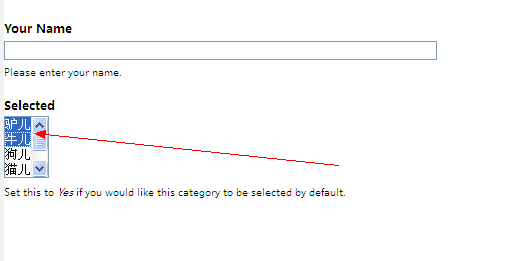
视觉效果不堪入目,经过努力,找到了一款相貌不错的module。下面请看使用方法:
第一:去官网下载(https://www.drupal.org/project/multiselect)模块,安装。

第二:安装完毕,接下来就要使用到Form API开发中去
-
<font face="微软雅黑">/**
-
* hook_menu().
-
* @author masx
-
*/
-
function front_menu(){ $items['formexample'] = array(
-
'title' => 'View the sample form',
-
'page callback' => 'drupal_get_form',
-
'page arguments' => array('front_nameform'),
-
'access callback' => TRUE,
-
'type' => MENU_NORMAL_ITEM
-
);
-
return $items;
-
}
-
/**
-
* Define a form. 构造表单
-
*/
-
function front_nameform() {
-
$form['user_name'] = array(
-
'#title' => t('Your Name'),
-
'#type' => 'textfield',
-
'#description' => t('Please enter your name.'),
-
);
-
$form['selected'] = array(
-
'#type' => 'select',
-
'#title' => t('Selected'),
-
'#multiple' => 3,
-
'#options' => array(
-
0 => t('驴儿'),
-
1 => t('牛儿'),
-
2 => t('狗儿'),
-
3 => t('猫儿'),
-
4 => t('驴儿'),
-
5 => t('牛儿'),
-
),
-
'#description' => t('Set this to <em>Yes</em> if you would like this category to be selected by default.'),
-
);
-
$form['submit'] = array(
-
'#type' => 'submit',
-
'#value' => t('Submit')
-
);
-
return $form;
-
}
-
/**
-
* Handle post-validation form submission.处理表单
-
*/
-
function front_nameform_submit($form, &$form_state) {
-
$name = $form_state['values']['user_name'];
-
drupal_set_message(t('Thanks for filling out the form, %name',
-
array('%name' => $name)));}
-
}</font>
第三:显示效果如下:

|